
Before you read: the UK
Luckyspy's Terms and Conditions (clauses 1.3 and 4.1) list The UK among prohibited jurisdictions. A resident of the UK is not allowed to register or play there, and the operator can close such an account.
Everything below describes what the brand publishes. It is not advice to sign up from the UK. See the UK status page for the details and the British law.
On this page
- Get the Luckyspy App Running on Your Phone in Minutes
- Luckyspy App vs Mobile Browser: What Changes on a Phone
- Claiming the Luckyspy Welcome Offer From Your Phone
- Logging In and Using One Account Across Devices
- Safety Checks for UK Players Using the Luckyspy App
- Staying in Control: Limits and Self-Exclusion on Mobile
- Questions and answers
Luckyspy can be played on a phone without third-party files. This 2026 guide covers the app route, the mobile browser, login and account parity with desktop for UK players aged 18+.
Get the Luckyspy App Running on Your Phone in Minutes
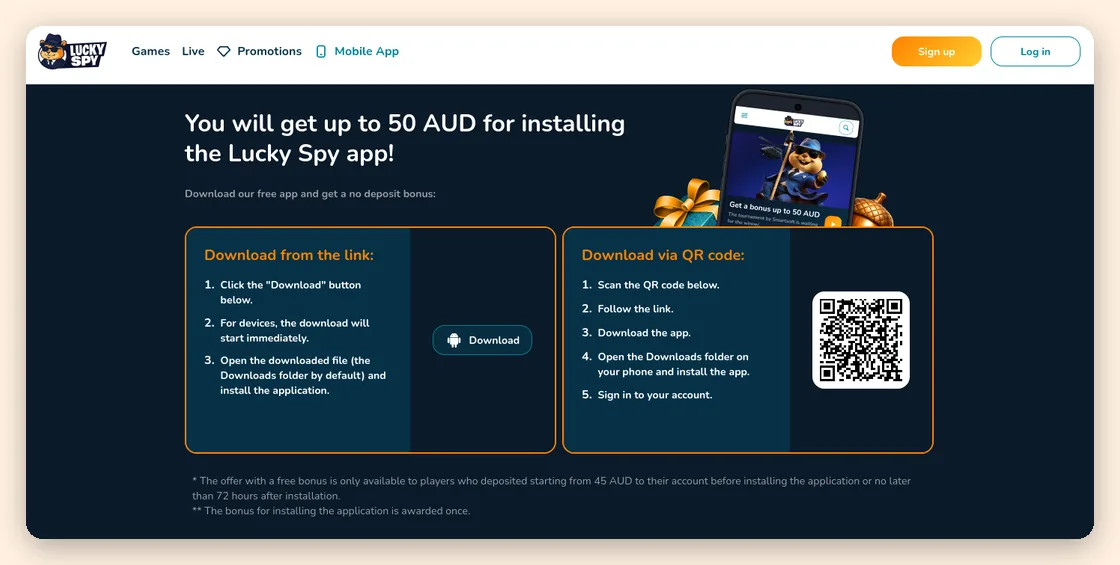
The Luckyspy app route starts at the official Luckyspy website: on Android, the site offers a downloadable install file through its Download button or a QR code; on iPhone or iPad, the browser menu is used to save a shortcut to the home screen instead. Neither route needs a file from a third-party site, which suits UK players who prefer to avoid risky downloads.
- Open your phone's browser and type the official Luckyspy address manually, or use a bookmark you made yourself.
- Register or log in with your existing account details.
- On Android, use the site's Download button or scan the QR code to get the install file; on iPhone or iPad, open the browser menu and choose the option to add the site to the home screen.
- Launch Luckyspy from the installed app or home screen icon whenever you want to play.
- Set your deposit limits in the account area before your first session.
Sticking to the official site only is advisable. Files shared through third-party pages, messengers or search ads may be modified, and they can put your login details and payment data at risk. Gambling is for adults aged 18 and over, and it carries a real risk of losing money.
Luckyspy App vs Mobile Browser: What Changes on a Phone
The Luckyspy app-style shortcut and the mobile browser open the same account on a phone or tablet. The differences are mainly convenience and update handling, not what you can play or how your balance works.
| Aspect | App / shortcut | Mobile browser | Desktop |
|---|---|---|---|
| Access | One tap from the home screen | Type the address or use a bookmark | Full browser window |
| Devices | Phone and tablet | Phone and tablet | Laptop or PC |
| Updates | Handled automatically by the site | Handled automatically by the site | Handled automatically by the site |
| Account and balance | Same account as desktop | Same account as desktop | Same account |
| Screen layout | Touch-first, compact | Touch-first, compact | Wider, more content at once |
Because a shortcut simply opens the site, updates need no manual installation. That is the main trade-off: you gain speed of access but get no extra features beyond the browser version. Screen size is the practical difference, as desktop shows more at once. Exact feature availability is listed in the account area.
Claiming the Luckyspy Welcome Offer From Your Phone
The Luckyspy welcome package is advertised as up to 400% + 350FS on first deposits; the detailed terms are not published openly and are shown in the account area. It is not a no-deposit offer, and it can be claimed from a phone or desktop.
To claim it on mobile, log in to your account, open the cashier and make a qualifying deposit as set out in the account area. Check the promotions page first, as the offer may need to be selected or confirmed before depositing.
Read the wagering terms in the cashier or on the promotions page before accepting. They set out how bonus funds and spin winnings can be used and withdrawn, and they can differ between offers. Only deposit money you can afford to lose, since bonuses do not reduce the risk of losing. Players must be 18 or over.
Logging In and Using One Account Across Devices
Luckyspy uses a single account on phone, tablet and desktop. New players register once, then log in with the same details on any device, so balance and account settings stay the same.
To register on mobile, open the official site, choose the sign-up option and complete the form with accurate personal details. Accurate details matter, as they may be checked during verification before withdrawals.
If a password is forgotten, use the password reset link on the login page and follow the instructions sent to the registered email. Choose a unique password and avoid logging in on shared or public devices.
For account or access problems, open the help section of the Luckyspy site, where the available contact routes are listed. Never share login details with anyone claiming to offer help.
Safety Checks for UK Players Using the Luckyspy App
On mobile, Luckyspy relies on SSL encryption to protect data in transit, KYC checks to confirm identity and age, and RNG-based game results. The operator's terms list the UK among jurisdictions where registration is not permitted, and the site holds no UK Gambling Commission licence.
SSL encrypts data sent between a phone and the site. A padlock symbol in the browser address bar is a basic sign it is active, and it is worth checking on public Wi-Fi.
KYC verification means players may be asked for identity and address documents, usually before a first withdrawal. It helps prevent underage play and fraud, so providing accurate details avoids delays.
RNG software determines game outcomes randomly, so results cannot be predicted or influenced by the player.
Before depositing, check these points:
- The site footer cites licence No. ALSI-202509039-FI1 from the Government of the Autonomous Island of Anjouan, not a UK Gambling Commission licence.
- Make sure the address in your browser is the official one.
- Read the terms for bonuses and withdrawals.
- Use a strong, unique password.
Staying in Control: Limits and Self-Exclusion on Mobile
Luckyspy offers deposit limits and self-exclusion, and play is restricted to adults aged 18+. These tools help UK players keep gambling within a budget, and they work best when set before play begins.
Deposit limits cap how much can be added to an account over a chosen period. Setting one early is easier than deciding mid-session.
Self-exclusion blocks access to an account for a period you choose, and it is worth using if gambling stops feeling like entertainment.
Gambling carries a real risk of losing money and should not be treated as income. Set a time and spending budget, and stop if you feel pressured to chase losses.
GamCare is an independent UK charity that offers free, confidential support and advice. Contact details are on its official website.
Questions and answers
Is the Luckyspy welcome offer available if I only play on a phone?
Yes. The Luckyspy welcome package, advertised as up to 400% + 350FS on first deposits, can be claimed from a phone, tablet or desktop, as it is tied to the account rather than the device. The detailed terms, including the qualifying deposit, are shown in the account area, and the offer is not a no-deposit bonus. Check the promotions page before depositing, as the offer may need to be selected first, and read the wagering terms in the cashier.
Why might KYC verification delay my first Luckyspy withdrawal?
KYC checks are usually requested before a first withdrawal, and delays most often come from details that do not match your documents or from unclear identity and address files. The trade-off is that verification slows the first payout but helps prevent fraud and underage play. Registering with accurate personal details and having identity and address documents ready reduces the chance of extra requests. Current processing times are shown in the cashier.
What should I do if the Luckyspy site looks different or asks for unusual details on my phone?
Stop and check the address in your browser first, since a copycat page can look similar to the real one. Confirm it is the official Luckyspy address you typed manually or saved as your own bookmark, and look for the padlock symbol that shows SSL is active. Do not enter login or payment details on pages reached through messengers or search ads. For genuine access problems, use the contact routes in the help section of the official site.
Is it risky to use Luckyspy on public Wi-Fi?
It carries more risk than a private connection. SSL encryption protects data in transit, and the padlock in the address bar shows it is active, but public networks and shared devices still expose you to other threats. Avoid logging in on shared or public devices, use a strong, unique password, and keep deposits for a trusted connection. Setting deposit limits in the account area adds a further safeguard.
How do I set deposit limits or self-exclude on Luckyspy from my phone?
Deposit limits and self-exclusion are managed in the account area, which works the same on phone, tablet and desktop. A deposit limit caps how much can be added over a chosen period, and self-exclusion blocks access for a period you choose. Setting limits before your first session is easier than deciding mid-play. If gambling stops feeling like entertainment, GamCare offers free, confidential support. Play is for adults aged 18+.
Continue reading
- Slots and gamesStudios, demo mode and bonus exclusions.
- Live casinoLive tables and how bonus rules treat them.
- PaymentsWhat the open pages say about deposits and the cashier.
- WithdrawalsTurnover rule, timings, caps and fees.
- Battles and prize drawsDaily, weekly and monthly battles and prize draws.
- Customer supportContact routes and how complaints work.
Where these facts come from
- Luckyspy Terms and Conditions, Account/Payouts/Bonuses rules and KYC policy (luckyspy.com, read 25 November 2026)
- Luckyspy promotions, app, FAQ and lobby pages (luckyspy.com, read 25 November 2026)
- Luckyspy site footer with the operator and licence statement (luckyspy.com, 25 November 2026)
Checked by the luckyspyy.uk editorial team on 25 November 2026. See how we review.